




















































1xBet app: how to download on Android (APK) and iOS
The wish to download 1xBet to a smartphone stems from the convenience of betting and access to the game lobby without being tied to a computer, but the operator is not included in the register of the Ukrainian regulator PlayCity. This guide covers the procedure for installing the client on Android via APK and on iOS, the system requirements, and the deposit terms from UAH 50 in crypto wallets and UAH 500 for Visa/Mastercard cards. The mobile app supports the full functionality of the cashier, the sports welcome bonus of up to UAH 3,000 with x5 wagering and biometric login. A full review of the platform, its legal status and payout limits is available in the review 1xBet in Ukraine.
Contents
1xbetua.com.ua is an information site: we do not accept bets or payments and do not organise gambling. The site contains affiliate links. Gambling can be addictive. Age 21+.
How to download 1xBet on Android via an APK file
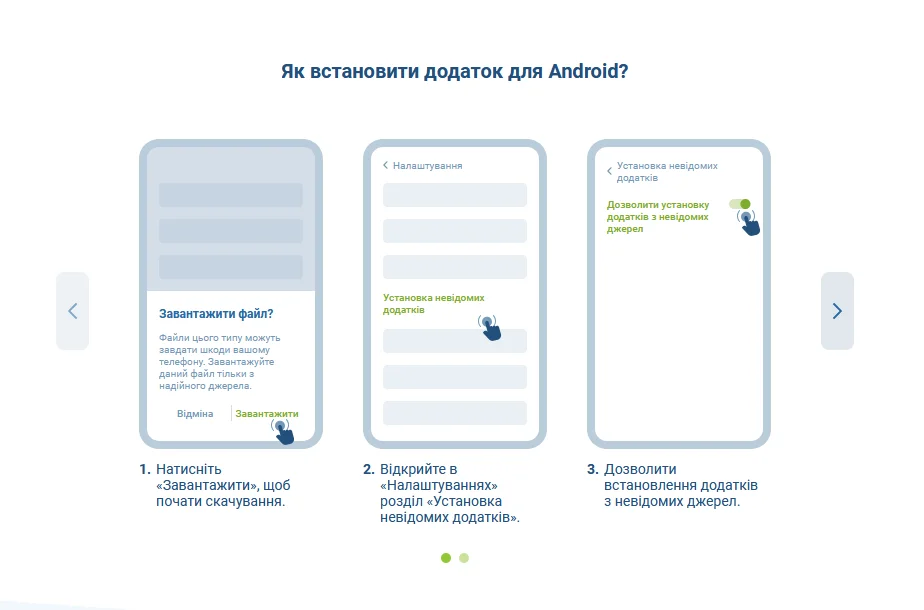
The operator's official app is not available in the Google Play store, as the store's rules restrict the placement of apps from offshore bookmakers without a local licence in Ukraine. For this reason, installation on Android smartphones is done manually using the 1xBet apk installation package.
- Open your smartphone's security settings and allow installation of apps from unknown sources for your browser.
- Download the current 1xBet installation file for Android directly from the mobile section of the platform.
- Find the saved file in the "Downloads" folder and tap it to start the installation.
- Wait for unpacking to finish, open the app and log in with your personal ID, phone number or email.
Once the installation is complete, it is recommended to return the Android security settings to their default state. Since the operator does not have a PlayCity licence, access to the download web page may be restricted by Ukrainian providers by decision of the NCEC (National Commission for the State Regulation of Electronic Communications); this is covered in more detail in the article 1xBet mirror.
Installing the app on iPhone and iPad (iOS)
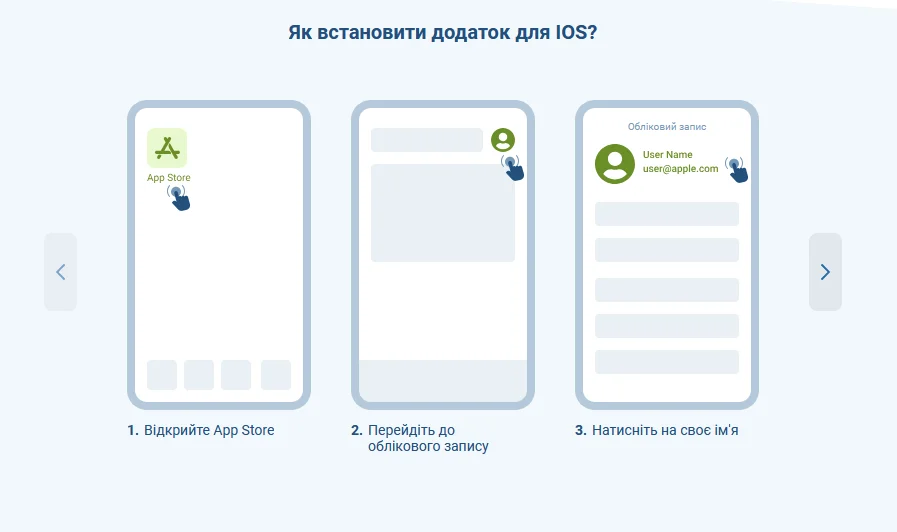
Unlike Android, the client for Apple devices is distributed via the official App Store. However, due to the lack of a Ukrainian licence, the app may not appear in the Ukrainian region of the catalogue, so users sometimes have to change their Apple ID account settings to download 1xBet on iPhone.
- Open the App Store, go to your profile and select "Country/Region".
- Change the region to a country where the app is officially available (for example, Cyprus or Colombia) and accept the terms of use.
- In the payment method field, select "None" and enter an address in the correct format for the selected region.
- Find the branded 1xBet app in the App Store catalogue, tap "Get" and confirm the download with Face ID or Touch ID.
Once the installation is complete, the Apple ID region can be switched back to Ukraine, and the app will continue to work normally. If changing account settings is inconvenient, it is enough to add a shortcut to the web version to the home screen from Safari.
System requirements and app functionality

The native 1xBet client is optimised for stable operation even on mid-range smartphones and with an unstable mobile internet connection. The basic technical specifications of the apps for both operating systems are listed below.
| Parameter | Android (APK) | iOS (App Store) |
|---|---|---|
| Minimum OS version | Android 5.0 or later | iOS 12.0 or later |
| Free storage space | From 150 MB | From 200 MB |
| Memory (RAM) | From 2 GB | From 2 GB |
| Interface languages | Ukrainian, Russian, English | Ukrainian, Russian, English |
| Biometric login | Fingerprint, PIN code | Face ID, Touch ID, PIN code |
In terms of functionality, the app fully duplicates the desktop site: the pre-match line, live events, more than 100 slot providers, crash games such as Aviator, the cashier and the 24/7 support chat are all available. The "Promo Code Store" also works in the app, and the rules for activating promotions are described in detail on the page 1xBet promo code and wagering terms.
Example: a user logged in to the app, topped up the account with UAH 600 via a Jeton e-wallet and enabled push notifications about bet slip settlement. After the match ended, the system instantly sent a notification about the win without the need to keep the browser open.
The 1xBet mobile version in the browser: how it differs from the client
If a user does not want to install third-party files or change the Apple ID region, the responsive website remains an alternative. It opens in Chrome, Safari or Firefox without downloading additional software.
- Speed and data: the native client caches interface elements, so it loads odds and slots faster and uses fewer megabytes.
- Updates: the browser version is updated automatically on the server side, while the APK on Android has to be updated manually from time to time.
- Availability: the website is more often subject to provider blocking by decision of the NCEC, while the app usually maintains a more stable connection.
- Cashier and KYC: both options have the same limits (from UAH 50–100 for crypto wallets, from UAH 500 for Visa/Mastercard cards) and manual verification without Diia and BankID.
Example: when topping up the account with UAH 1,000 in USDT via the mobile browser, future withdrawals will still follow the deposit method rule: only to the same crypto wallet, regardless of whether the request is submitted from the browser or from the app.
Updates, security and possible installation errors
The main risk when trying to download 1xBet from third-party catalogues is downloading a modified APK file with malicious code. Such fakes can intercept passwords, SMS codes or e-wallet details.
- "App not installed" error: occurs due to insufficient free storage, an outdated version of Android or a conflict with a previous version of the client (the old version must be removed before updating).
- Installation blocked by the system: check whether permission to install from unknown sources is enabled for the specific browser through which the file was downloaded.
- Account protection: after the first login to 1xBet, enable two-factor authentication (2FA) and biometric login lock.
Overall, the decision to download 1xBet to a smartphone gives quick access to the betting line, slots and cashier with minimal data usage. At the same time, the lack of a PlayCity licence, the need to install the APK manually on Android and the National Bank of Ukraine (NBU) restrictions on bank cards remain significant risk factors — all details of the legal status are collected in the review 1xBet casino and sportsbook.
Frequently asked questions (FAQ)
Why is the app not on the official Google Play?
The 1xBet app is not on Google Play in Ukraine because of the store's policy on gambling apps without a local PlayCity licence. Android users install the client manually with an APK file.
Is it safe to install the APK file on Android?
The original 1xBet apk file contains no viruses if it is downloaded from the platform's verified source. The danger comes from third-party forums and unofficial catalogues, where modified copies turn up.
How do I update the mobile client to a new version?
When an outdated version of 1xBet is launched, the system usually offers to download the update automatically. On iOS updates arrive through the App Store, and on Android by installing the new APK over the previous one.
Can I sign up and get a bonus from my phone?
Yes, all four sign-up methods are available in the 1xBet mobile app for players aged 21 and over. New users can choose the 100% sports bonus up to UAH 3,000 (x5 wagering) or the casino package up to the equivalent of €1,500 + 150 free spins (x35 wagering).
Does the app support verification via Diia?
No, 1xBet does not support Diia or BankID because it has no Ukrainian licence. Identity verification (KYC) in the app is done by uploading photos of a passport or ID card and takes up to 24 hours.
What deposit limits apply in the mobile client?
The financial terms in the 1xBet app are the same as on the website: the minimum top-up via e-wallets and cryptocurrencies is UAH 50–100, and UAH 500 for Visa/Mastercard bank cards, subject to possible NBU restrictions.